How to Manage Bookings Across Multiple Locations

How to Manage Bookings Across Multiple Locations Running one location is complicated enough. Add a second, third, or tenth, and appointment scheduling becomes exponentially harder. Staff work different hours at different branches. Clients book at one location when they meant to book at another....

How to Manage Bookings Across Multiple Locations

How to Manage Bookings Across Multiple Locations

Running one location is complicated enough. Add a second, third, or tenth, and appointment scheduling becomes exponentially harder. Staff work different hours at different branches. Clients book at one location when they meant to book at another. Reporting is scattered across separate calendars. And one overworked manager is trying to keep it all straight.

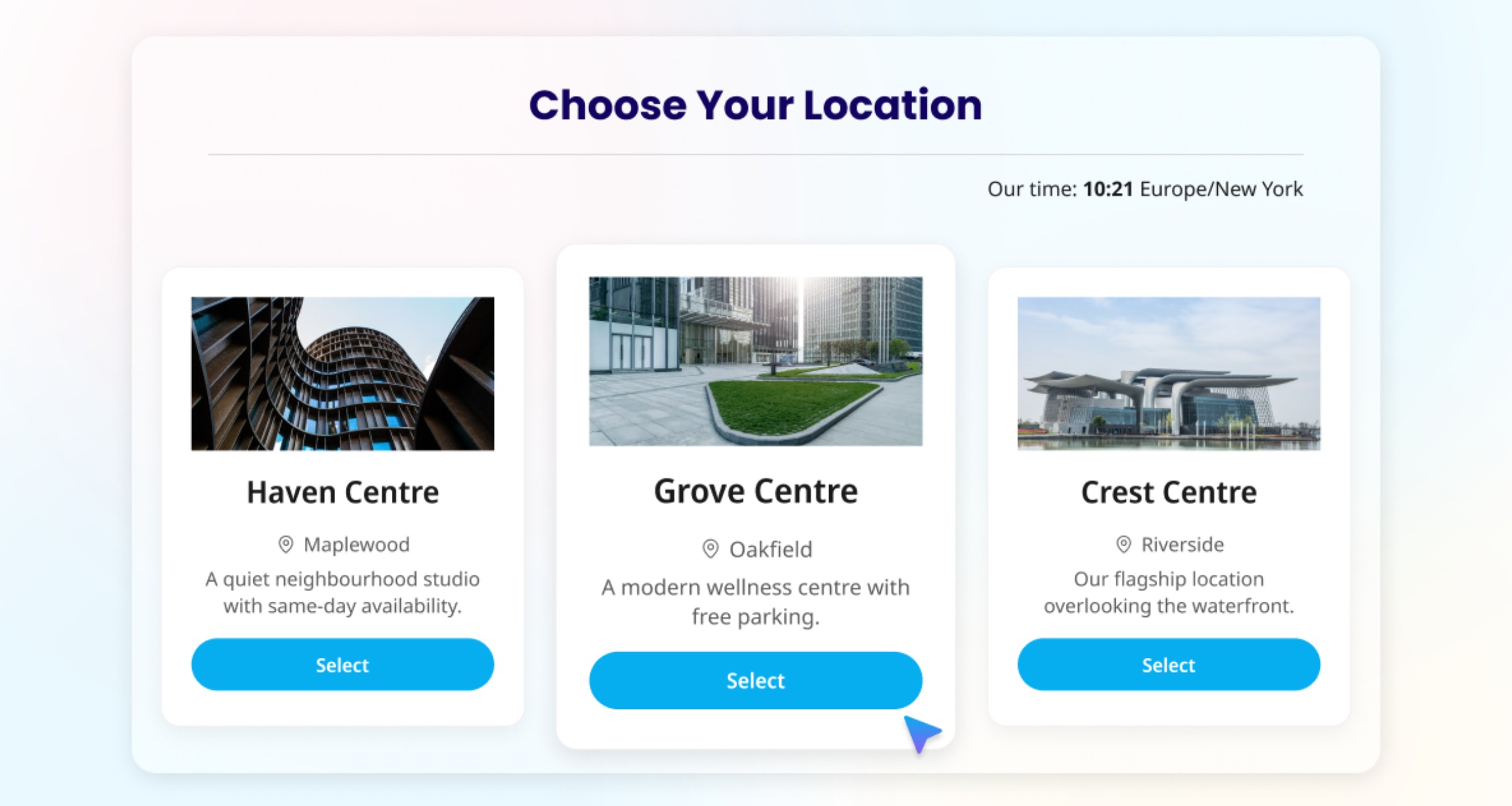
The businesses that manage multi-location booking well share a common approach: they run every location from one account instead of juggling separate logins. One platform manages all locations, all staff, and all appointments, and clients pick their location as a step within a single shared booking flow rather than visiting a completely separate booking site per branch.

This guide covers how to set up and manage a booking system that works across multiple locations without creating scheduling chaos.

The Core Problem: Fragmented Scheduling

Most multi-location businesses start with a single-location booking tool and duplicate it when they open a second branch. This creates immediate problems.

Separate calendars mean no cross-visibility. The manager at Location A cannot see Location B's availability without logging into a separate account. Staff who work at both locations risk double-bookings because neither system knows about the other.

Clients book the wrong location. If your booking links look similar, clients accidentally book at a branch across town. This creates frustration, cancellations, and wasted slots.

Reporting is manual. Pulling a business-wide view of bookings, revenue, no-show rates, or staff utilization requires exporting data from each location and combining it in a spreadsheet. This is time-consuming and error-prone.

Branding is inconsistent. When each location runs on its own separate account instead of one shared platform, logos, descriptions, and policies drift apart over time.

The fix is a single booking platform that supports multiple locations natively, not separate accounts cobbled together.

What to Look for in Multi-Location Booking Software

Not all booking tools handle multiple locations well. Some charge per location. Others treat each branch as a completely separate account. The features that matter most:

Centralized dashboard. One login where you can view and manage appointments, staff, and settings across all locations. This is non-negotiable for any business with more than two branches.

A location step in the booking flow. Once you have more than one location, clients should be prompted to pick their location early in the booking process, then see only the relevant providers, services, and availability for that branch, within a single shared booking page rather than a separate site per branch.

Cross-location staff assignment. Staff who work at multiple branches need to be connected to each location. Most platforms do not let a single provider carry two different weekly schedules split by location; instead, differentiation is usually achieved by pairing that provider with specific services that are only available at a specific location on specific days, so their calendar reflects the right place automatically.

Reporting you can filter. Revenue and bookings should be exportable and filterable by location (and by provider, service, or payment method) from a single dashboard. Treat more granular metrics, like automated no-show tracking, as something you may need to calculate manually, since that kind of tracking is limited to nonexistent on most booking platforms.

Consistent policies. Cancellation rules, payment requirements, and reminder settings are typically account-wide on most platforms rather than configurable per location, so plan for one standard policy across all branches rather than assuming you can vary it location by location.

Pricing that scales. Some tools charge per location, which gets expensive fast. Look for platforms that include multi-location support in their pricing without multiplying the base cost for each branch. SimplyBook.me's multi-location feature lets you manage all branches from one account.

Setting Up Multi-Location Booking: Step by Step

Step 1: Add your locations. In your booking platform, create an entry for each physical location. Include the full address, phone number, and any location-specific details (parking instructions, entrance notes). Each location needs accurate address data for Google Business Profile integration and local SEO.

Step 2: Understand how your availability is actually calculated. Most booking systems do not give each location its own working-hours calendar. Instead, the time slots clients can book come from the overlap of your company schedule, each service's schedule, and each provider's schedule. If you want a downtown location effectively open earlier than a suburban one, you achieve that by setting different hours for the providers or services tied to that location, not by setting "location hours" directly.

Step 3: Assign staff to locations. Connect each team member to the locations where they work. If someone effectively works different hours at each branch, set this up through different provider/service combinations per location (for example, Provider A delivering Service X at Location 1 on Mondays through Wednesdays, and the same provider delivering Service Y at Location 2 on Thursdays and Fridays) rather than expecting a single weekly schedule to split automatically by location.

Step 4: Connect services to locations through your providers. Locations are typically linked via your providers rather than assigned to services directly. If only your flagship location offers a premium treatment, make sure only the provider(s) based there are set up to deliver it.

Step 5: Let the location step do the work. Once you have two or more locations set up, most platforms automatically add a location-selection step to the booking flow, so you generally do not need to build separate booking pages per branch. If you want something that feels dedicated to one location (for a local landing page, for example), check whether your platform lets you configure a booking widget pinned to that specific location, while the underlying booking site itself stays shared.

Step 6: Connect each location to Google Business Profile. Each physical location should have its own Google Business Profile with a direct booking link. This helps ensure clients who find you via Google Maps land on your booking flow ready to select the correct location.

Managing Staff Across Locations

Staff scheduling is the single biggest pain point in multi-location booking. Here is how to handle the most common scenarios.

Staff who work at one location only. This is the simplest case. Assign them to their location and their availability is limited to that branch. No cross-scheduling conflicts.

Staff who rotate between locations. Most systems do not offer a single "weekly schedule per location" setting for one provider. Instead, set this up through separate provider/service/location pairings — for example, a provider connected to Service A at Location 1 (available Monday through Wednesday) and the same provider connected to Service B at Location 2 (available Thursday and Friday). The client-facing calendar reflects the correct location automatically based on which service the client books, without needing a dedicated per-location schedule toggle.

Staff who cover shifts across locations. Sometimes a team member fills in at a different branch on short notice. Check how easily your platform lets you adjust a provider's location or service assignment for a single day without disrupting their default setup.

Managing overtime and overcommitment. When a staff member works at multiple locations, it is easy to accidentally schedule them beyond their contracted hours. Most booking systems do not flag this automatically, so track total hours across locations manually (a shared spreadsheet or your HR/rota tool) until you are confident the split is sustainable.

Client continuity. When possible, let clients book with the same provider across locations. A client who sees therapist James at Location A should be able to find and book with James at Location B if they prefer. The booking system should show James's availability across all his assigned locations when a client selects him.

Client Experience: Making Location Selection Effortless

A confusing location selection process leads to wrong-location bookings, cancellations, and client frustration. Make it foolproof.

Show the full address at every step. The location name alone is not enough. "Downtown Branch" means nothing if the client does not know the street. Display the full address on the location selector, the booking confirmation, and every reminder.

Use maps. Most booking platforms display a basic map automatically once you add a full address, and you can typically add a separate link to Google Maps alongside it for extra clarity. Visual confirmation prevents errors.

Default to the nearest location (if possible). Some booking tools can detect the client's approximate location and default to the closest branch. This is not essential but reduces friction for multi-location businesses in the same metro area.

Include location in every communication. The booking confirmation, every reminder, and the follow-up message should include the branch address. Repeating the location at every touchpoint catches any confusion before the client drives to the wrong place.

Understand the limits of rescheduling. If a client realizes they booked the wrong branch, most reschedule flows only let them change the date and time of that same booking, not the location itself. Fixing a wrong-location booking usually means canceling and rebooking at the correct branch, so make the initial location choice as clear as possible to avoid this in the first place.

Reporting and Performance Tracking

Multi-location reporting turns raw booking data into operational intelligence. The metrics to track:

Bookings per location per week. This is your baseline utilization metric. Comparing bookings across branches reveals which locations are underperforming and may need marketing support or schedule adjustments.

No-shows by location, tracked manually if needed. No-show rates often vary by branch (a location near a transit hub may see more than a suburban branch with dedicated parking), but automatic no-show tracking is unreliable to nonexistent on most booking platforms. You may need to log this manually per location rather than relying on a built-in report before deciding where to apply deposits or extra reminders.

Revenue per location. Track top-line revenue and revenue per available appointment hour, using your platform's exportable booking and payment reports. A branch with fewer bookings but higher-value services may outperform a busier branch on revenue per hour.

Staff utilization. What percentage of each staff member's available hours are booked? This is a useful metric to calculate from your bookings and schedule data even if your platform does not surface it as a single automatic report.

Popular services by location. Service demand often varies by branch. Your downtown location may see higher demand for quick lunchtime services, while your suburban branch skews toward longer, premium appointments. Use this data to tailor your service offerings per location.

Client retention by location. Are clients returning to the same branch? If a location has low return rates, investigate the client experience there.

Pull these reports monthly and compare trends across locations. The goal is not just tracking numbers but finding actionable differences between branches that drive decisions.

Common Multi-Location Mistakes

Using separate accounts per location. This is the most damaging mistake. Separate accounts mean separate data, separate logins, and no cross-visibility. Always use a single platform with native multi-location support.

Assuming you can set holidays per location. On most platforms, holidays and closures are configured at the company level, not per branch. If one location closes for a local holiday that others do not observe, you will typically need to block that closure some other way (for example, adjusting that location's providers' availability directly), since a dedicated per-location holiday calendar is usually not available.

Not connecting each location to Google Business Profile. Each physical branch needs its own Google Business Profile with the correct booking link. Without this, clients who find you on Google Maps cannot book at their nearest location directly.

Assuming all locations need identical services. Client demand varies by area, demographics, and competition. Review service performance per location quarterly and adjust offerings accordingly.

Ignoring timezone visibility for clients. Most booking systems can show times based on the client's own device timezone, with an option for the client to adjust it manually, but this is typically a per-client setting rather than something tied to the location itself, and it often needs to be switched on by the business first. If your locations span timezones, verify this client-facing timezone display is enabled rather than assuming it works automatically per location out of the box.

Frequently Asked Questions

What is the best booking software for multiple locations?

The best multi-location booking software offers a centralized dashboard, a smooth location-selection step in the booking flow, straightforward staff assignment across branches, exportable and filterable reporting, and pricing that does not multiply per branch. SimplyBook.me supports multi-location management from a single account. Other platforms that handle multiple locations include Square Appointments (at the Plus tier, $29/month per location as of March 2026) and Fresha (for beauty and wellness only).

How do I prevent clients from booking at the wrong location?

Display the full address (not just the branch name) at every step of the booking process. Include the address in the booking confirmation and every reminder. Use a clear location-selection step at the start of the booking flow, which most platforms add automatically once you have more than one location.

Can staff work at multiple locations in the same booking system?

Yes, with the right setup. You connect a staff member to each location they work at, but most systems will not automatically give one provider two different weekly schedules split by location. The common workaround is pairing that provider with different services at each location, so the calendar reflects the correct availability without manual toggling.

How do I manage different services at different locations?

Locations are usually connected through your providers rather than assigned to services directly. To offer a specialized service only at one branch, make sure only the provider(s) based there are set up to deliver that service; providers not connected to that location simply will not offer it there.

Should I use separate booking links for each location?

Not by default. Most platforms add a single, shared booking page with a location-selection step once you have two or more locations, rather than a separate URL per branch. If you want something that feels location-specific, such as for a local landing page, check whether your platform lets you configure a booking widget pinned to one location — that is usually how a dedicated "per-location" booking experience is achieved. Connecting each location to its own Google Business Profile with a direct booking link is still worth doing regardless.

How do I compare performance across locations?

Use your booking platform's exportable and filterable reports to compare bookings and revenue per location. Treat no-show rate and staff utilization by location as figures you may need to calculate manually, since automatic tracking for these is limited on most platforms. Pull this monthly and compare trends to identify underperforming branches and top performers.

Unlock exclusive content

Get booking tips, product updates, and inspiring stories to help you grow your service business — straight to your inbox